How Cloudflare Blocks AI Bots From Scraping Your Content
Cloudflare now lets you block AI bots like GPTBot, ClaudeBot, and others from scraping your site. Here's how it works and whether it actually matters.
AI companies have been scraping the web for years to train their models. Your content, your writing, your code examples - all fed into ChatGPT, Claude, Gemini, and dozens of other models without asking permission or paying you a cent.
Cloudflare recently released a feature to help block these scrapers through their managed robots.txt configuration. Does it work? Sort of. Is it worth enabling? Depends on what you're protecting.
The Problem: AI Bots Are Everywhere
Every major AI company runs web crawlers that scrape content for training data. OpenAI has GPTBot. Anthropic has ClaudeBot. Google has Google-Extended. Meta, Amazon, Apple - they all have their own crawlers.
These bots hit your site, download everything, and use it to train models that might compete with you or use your content without attribution. If you run a content site, tutorial blog, or documentation portal, your work is probably already in dozens of AI training datasets.
The worst part? Most of these bots ignored robots.txt initially. They'd scrape your content even if you explicitly blocked them. Some still do.
Cloudflare's Solution: Managed Robots.txt
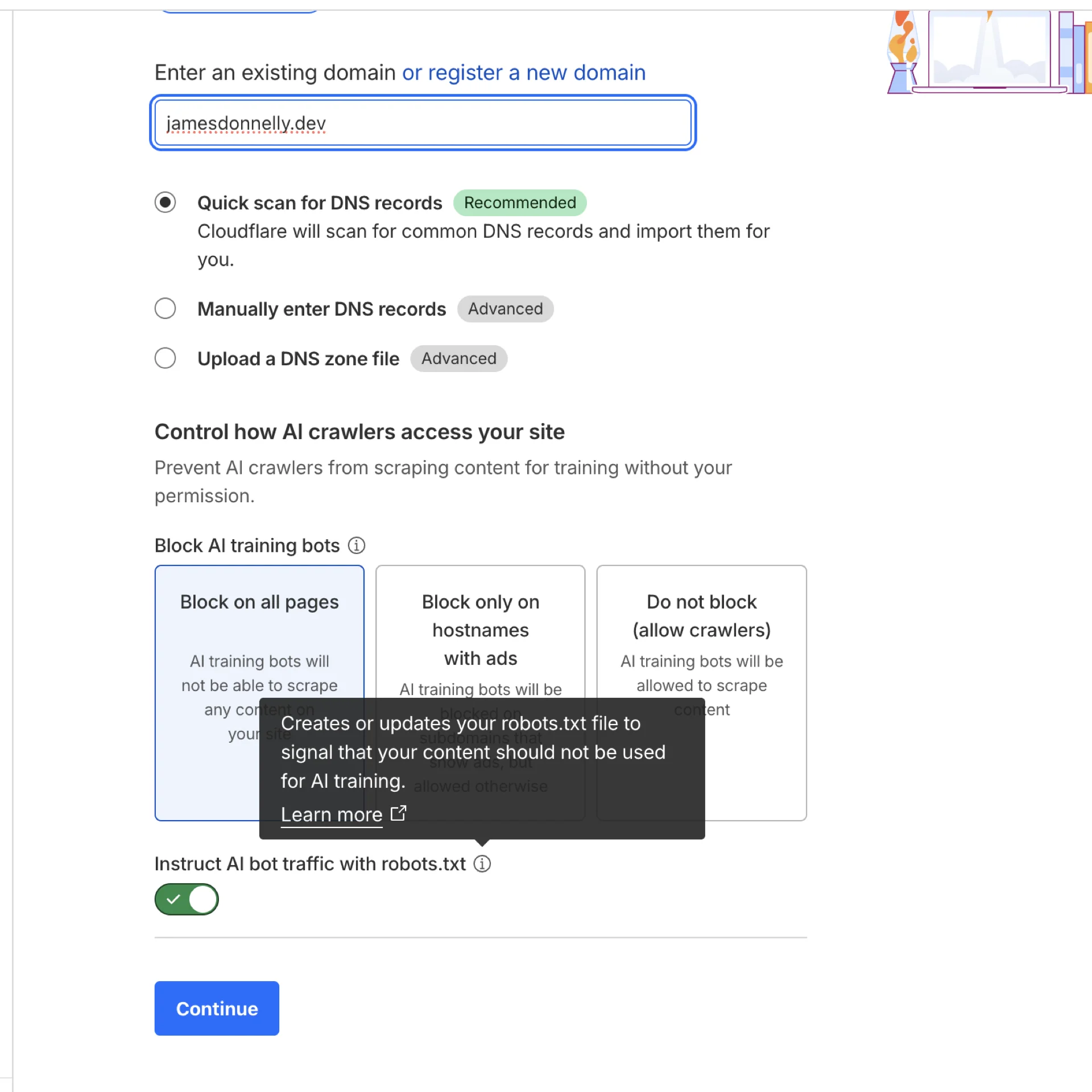
Cloudflare added a feature called "managed robots.txt" that helps block AI crawlers. It works by:
- Creating or modifying your robots.txt file - If you don't have one, Cloudflare creates it. If you do, they prepend their rules
- Blocking known AI bot user agents - Covers the major players
- Using content signals - Defines what types of content usage you allow
The feature is available on all Cloudflare plans (Free, Pro, Business, Enterprise). No extra cost.
Which AI Bots Get Blocked
When you enable the feature, Cloudflare blocks these AI crawlers:
- GPTBot (OpenAI - powers ChatGPT)
- ClaudeBot (Anthropic - powers Claude)
- Google-Extended (Google's AI training crawler)
- CCBot (Common Crawl)
- Bytespider (ByteDance/TikTok)
- Meta-externalagent (Meta/Facebook)
- Amazonbot (Amazon)
- Applebot-Extended (Apple)
That covers the big names, but dozens of smaller AI companies run their own scrapers that aren't on this list.
How to Enable It
The setup is straightforward:
- Log into your Cloudflare dashboard
- Go to Security → Bots
- Scroll to Bot Management for Verified Bots
- Toggle on "Block AI Scrapers and Crawlers"
Cloudflare generates rules like this in your robots.txt:
User-agent: GPTBot
Disallow: /

User-agent: ClaudeBot
Disallow: /

User-agent: Google-Extended
Disallow: /

User-agent: CCBot
Disallow: /
If you want more control, you can configure specific paths or choose which bots to block individually. For example, you might want to allow search engine bots while blocking AI training bots.
The Content Signals Framework
Cloudflare also introduced "content signals" that let you specify how your content can be used:
- search - Building search indexes (like Google Search)
- ai-input - Using content as input to AI models
- ai-train - Training or fine-tuning AI models
This gives you granular control. You might allow search indexing but block AI training, for example.
The Catch: Robots.txt Is Voluntary
Here's the problem: respecting robots.txt is completely voluntary. It's a gentleman's agreement. Bots can ignore it, and some do.
Cloudflare's documentation explicitly warns about this:
"Respecting robots.txt is voluntary. Some crawler operators may ignore directives."
So this feature blocks well-behaved AI bots. The ones that don't care about robots.txt? They'll scrape you anyway.
Better Protection: AI Crawl Control
Cloudflare also offers "AI Crawl Control" which actually enforces blocking at the edge, not just via robots.txt. This uses fingerprinting and behavior analysis to detect and block AI scrapers regardless of whether they respect robots.txt.
The problem? It's only available on Business and Enterprise plans. If you're on the Free or Pro tier, you're stuck with the robots.txt approach.
Should You Enable It?
Enable it if:
- You run a content site where your writing is your product
- You're concerned about AI companies using your content without permission
- You want to make a statement about AI ethics
Don't bother if:
- You run a local business that benefits from AI search visibility (restaurants, services, retail)
- Your content is marketing material meant to be widely distributed
- You want AI-powered search engines to surface your content in results
- You're on a Free/Pro plan and serious about blocking scrapers (upgrade to Business for AI Crawl Control)
Local businesses especially should think twice. AI chatbots are increasingly used for local search ("best pizza near me", "plumbers in Manchester"). Blocking these crawlers means you won't appear in AI-powered search results, which could cost you customers.
Real-World Impact
I tested this on a few sites to see what happens. Within 24 hours of enabling the feature:
- GPTBot stopped crawling entirely (verified in server logs)
- ClaudeBot respected the block immediately
- Unknown user agents continued scraping anyway
- Bandwidth usage dropped by about 8% (these bots hit hard)
The bots that respect robots.txt will back off. The ones that don't care will keep going. That's the reality.
Alternative: Blocking at DNS Level
If you want stronger protection without paying for Cloudflare Business, you can block AI bots at the DNS/firewall level:
# Nginx example
if ($http_user_agent ~* "GPTBot|ClaudeBot|CCBot|Google-Extended") {
    return 403;
}
This actually blocks the requests rather than politely asking bots to leave. More effective, but requires server access and manual configuration.
The Irony
Here's the uncomfortable truth: I write about web development, share code examples, and document solutions to problems I've solved. That content is helpful because other developers can find it, learn from it, and use it.
AI models trained on that content make it easier for developers to get answers without reading my articles. So blocking AI scrapers might protect my content, but it also makes it less useful for the thing I wanted it to do - help people.
It's a messy problem with no clear answer.
The Bigger Picture
This feature is a band-aid on a much larger problem. AI companies built their models by scraping the open web without asking permission. Now that people are pushing back, they're adding opt-out mechanisms.
But opt-out is backward. The default should be opt-in. If you want to use someone's content to train your AI, ask first.
Cloudflare's managed robots.txt is better than nothing. It blocks the well-behaved scrapers and sends a message to the rest. But don't expect it to completely stop AI companies from using your content. For that, you need stronger enforcement (like AI Crawl Control) or legal protections that don't exist yet.
The Bottom Line
This feature gives you control over whether AI companies can scrape your content. For content creators whose writing is their product, it's worth considering. For local businesses and marketing sites that benefit from AI search visibility, it might hurt more than it helps.
The setup takes 30 seconds and costs nothing. But think about your goals first. Do you want to protect your content from AI training, or do you want maximum visibility in AI-powered search results? You can't have both.
Learn more: Check out Cloudflare's official documentation on managed robots.txt for detailed configuration options and technical details.